
SEO for Small Business Websites: A Beginner’s Guide
Small Business SEO SEO Basics Keyword Research Technical SEO Local SEO
Having a business website is an important first step, but it does not guarantee potential customers will find you through Google. If your website does not appear for relevant searches, you could be missing opportunities to attract visitors, generate enquiries, and grow your business.
Search engine optimization (SEO) helps search engines understand your website and helps potential customers discover relevant pages. For small businesses in the United States, a practical SEO strategy starts with the right keywords, useful service pages, technical accessibility, and clear performance tracking. This beginner’s guide explains what to prioritize, how to identify common problems, and how to build a manageable SEO plan.
Table of Contents
- What Is SEO for Small Business Websites?
- How Does Google Search Work?
- What Should You Check Before Starting SEO?
- How Do You Find the Right Keywords?
- How Do You Match Keywords to the Right Pages?
- How Do You Optimize Website Pages for SEO?
- Which Technical SEO Issues Matter Most?
- When Does a Small Business Need Local SEO?
- How Can You Build Useful Content and Credibility?
- How Do You Measure SEO Performance?
- Common SEO Mistakes Small Businesses Should Avoid
- Frequently Asked Questions
- Conclusion
What Is SEO for Small Business Websites?
SEO for small business websites is the process of improving a website so search engines can discover, understand, and potentially show its pages for relevant searches. It includes keyword research, on-page optimization, technical improvements, internal linking, and efforts to establish credibility. The purpose is to connect your business with people searching for the products, services, or information you provide.
For example, a roofing company in Austin might optimize a service page for “roof replacement company in Austin” while publishing a separate article answering “how long does a roof last.” These pages serve different search intentions but can support the same business goal. Organic search does not require paying for every click, although SEO still requires investment, ongoing work, and realistic expectations.
How Does Google Search Work?
Google Search generally involves three stages: crawling, indexing, and ranking. Crawling allows Google to discover pages, while indexing involves analyzing and potentially storing them in its index. Ranking occurs when Google’s systems evaluate available pages and select results that may best satisfy a person’s query. A page being discovered does not guarantee that it will be indexed or rank prominently.
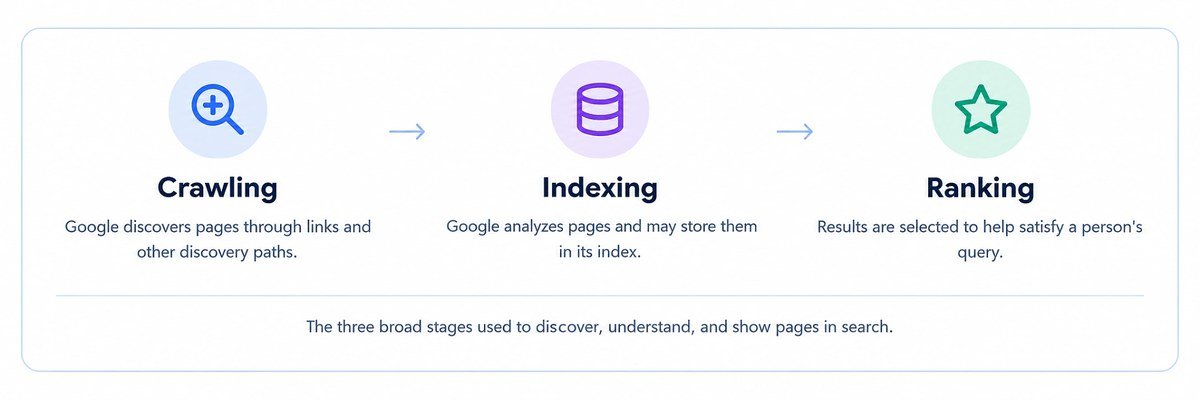
Understanding these stages helps you troubleshoot problems before creating more content. If an important page cannot be discovered or is excluded from indexing, publishing additional articles may not solve the underlying issue. Google’s SEO Starter Guide explains how website owners can help search engines find and understand their content.
What Should You Check Before Starting SEO?
Begin by reviewing your homepage, main service pages, contact page, and existing blog posts. Check whether visitors can quickly understand your offer, find relevant information, and contact your business. Identify pages that are outdated, difficult to navigate, repetitive, or missing essential information. This initial review helps you prioritize meaningful changes instead of applying SEO techniques without knowing what your website needs.
Next, use Google Search Console to inspect important URLs and review search performance. The URL Inspection tool can help investigate individual pages, while the Performance report shows impressions, clicks, search queries, and average position. If a valuable page is not indexed, investigate the cause before expanding your content. If it receives clicks but generates few enquiries, review its message, relevance, and conversion process.
How Do You Find the Right Keywords?
Keyword research helps you understand how potential customers describe their needs. Start by listing your main services, the problems you solve, common customer questions, and the locations you serve. Use customer conversations, Google Search Console data, competitor content, and keyword research tools to identify relevant search terms. Assess search intent, competition, and business value rather than choosing keywords solely because their estimated search volume is high.
For example, a US website development company might research “small business website design services,” “website redesign cost,” and “what should a small business website include.” These searches indicate different needs, from hiring a provider to researching requirements. Choose terms that reflect your audience’s language and the answers your business can genuinely provide. Specific, relevant searches may be more useful than broad phrases that attract visitors unlikely to become customers.
How Do You Match Keywords to the Right Pages?
Keyword-to-page mapping means assigning each important search theme to the most relevant existing or planned page. Your homepage should introduce the business, service pages should explain specific offerings, and educational articles should answer questions. Mapping keywords before writing helps avoid unnecessary duplication and gives each page a clear purpose.
Consider this example for a small business website design company:
| Page | Example search theme |
|---|---|
| Homepage | Website development company |
| Service page | Small business website design services |
| Blog post | What should a small business website include? |
| Case study | Small business website redesign example |
Connect related pages with contextual internal links. An educational article can link to a relevant service page when readers need professional help, while a service page can link to useful supporting information. Create a new page when it serves a distinct purpose, not merely to target another variation of the same keyword.
How Do You Optimize Website Pages for SEO?
On-page SEO helps search engines and visitors understand a page’s subject. Write a descriptive title tag, use a clear H1, organize supporting information with relevant subheadings, and create a useful meta description. Explain your services and their benefits clearly, answer likely customer questions, and use keywords naturally. Descriptive URLs and relevant internal links can also improve navigation and make the relationship between pages easier to understand.
For example, a generic title such as “Our Services” tells searchers little about a page. “Small Business Website Design Services | Brand Name” is more descriptive when that accurately reflects the page. Make the next step clear with an appropriate call to action, such as requesting a quote or booking a consultation. If visitors arrive but do not enquire, review the offer, evidence of credibility, page clarity, and contact process rather than assuming the problem is keyword usage alone.
Which Technical SEO Issues Matter Most?
Technical SEO helps search engines access and interpret important pages. Check that valuable URLs are not accidentally blocked from crawling or marked noindex. Review canonical tags and redirects when duplicate or similar URLs exist, and maintain an XML sitemap that contains your preferred, indexable pages. A sitemap can aid discovery, but it does not guarantee that Google will crawl or index every listed URL.
Also test your website on mobile devices, confirm that navigation and forms work properly, and investigate loading performance and Core Web Vitals. Compress oversized images and address unnecessary scripts or layout shifts when they affect the experience. Prioritize issues based on their impact on important pages and visitors. Fixing an indexing problem on a critical service page generally deserves more attention than a minor warning affecting an unimportant URL.
When Does a Small Business Need Local SEO?
Local SEO is especially useful for eligible businesses serving customers in particular geographic areas. Keep your business details accurate, explain your service area on your website, and maintain an appropriate Google Business Profile where eligible. Choose accurate business categories and encourage genuine customer reviews. See Google’s Business Profile eligibility guidance before creating or managing a listing.
For example, a cleaning company serving Tampa should clearly describe its services and coverage rather than relying on a generic homepage. Location pages can help when they provide meaningful information about services available in different areas, but publishing many near-identical pages with swapped city names adds little value. Businesses targeting customers nationwide may benefit more from service-specific pages, useful resources, and industry expertise than from location-focused content.
How Can You Build Useful Content and Credibility?
Create content around questions your customers ask before choosing a product or service. A web development company might publish a guide to website requirements, while a contractor could explain how to compare project estimates. Give readers complete, accurate answers, use specific examples where appropriate, and link to relevant service pages when they offer a natural next step. Google’s people-first content guidance is a useful reference when planning articles.
Credibility also depends on demonstrating genuine knowledge and earning trust. Keep business information accurate, identify authors where appropriate, and support important claims with reliable sources. Relevant links from reputable websites may help people discover your business, but focus on earning them through useful resources, legitimate partnerships, and industry contributions. Avoid buying links intended to manipulate rankings or relying on automated link schemes. Do not invent client results, reviews, or credentials to make your website appear more authoritative.
How Do You Measure SEO Performance?
Measure SEO using data rather than assumptions. Google Search Console helps you track search impressions, clicks, click-through rate, queries, and average position. Website analytics can show what visitors do after arriving, while properly configured conversion tracking can help measure actions such as form submissions or calls. Together, these tools provide a clearer picture of whether search visibility is bringing relevant visitors and contributing to business goals.
Use performance patterns to guide your next steps. If a page receives few impressions, investigate indexing, search demand, and relevance. If impressions increase but clicks remain low, review the page title, search intent, and competing results. If visits increase without enquiries, examine the quality of the traffic, the service offer, and the contact process. Rankings and traffic alone do not establish business success; qualified leads and customers provide a more meaningful measure of value.
Common SEO Mistakes Small Businesses Should Avoid
Avoid choosing keywords based only on volume, stuffing target phrases into content, or creating multiple pages that answer the same question. Publishing more articles does not automatically improve search visibility. Each page should have a distinct purpose, provide useful information, and match the needs of its intended audience. Similarly, avoid making repeated URL changes, buying manipulative backlinks, or treating every technical warning as an urgent problem without evaluating its impact.
Another common mistake is judging performance by traffic alone. A high-traffic article may attract people who are not interested in your services, while a smaller number of relevant visitors could generate valuable enquiries. Track meaningful outcomes alongside search visibility, and make changes based on evidence. SEO is an ongoing process: improvements should reflect what your customers need and what the data shows, not a fixed formula that guarantees rankings.
Frequently Asked Questions
Can I do SEO for my small business website myself?
Yes. You can handle foundational tasks such as keyword research, page optimization, internal linking, indexing checks, and performance monitoring. More complex technical issues or highly competitive markets may require specialist assistance with small business SEO.
How long does SEO take to work?
There is no universal timeline. Some changes may be reflected relatively quickly, while others can take several months. Results depend on your website, competition, the improvements implemented, and how search engines respond.
Is local SEO necessary for every small business?
No. Local SEO is particularly relevant to eligible businesses serving defined geographic areas. Businesses serving customers across the country may need to focus more on service pages, products, and informational content.
How do I know whether my SEO strategy is working?
Monitor impressions, clicks, relevant organic visits, and conversions. Where reliable tracking is available, measure qualified enquiries, customers, and revenue instead of relying on keyword rankings alone.
Conclusion
SEO for small business websites starts with understanding your customers and making important pages easy to discover, understand, and use. Research relevant keywords, match them to the right pages, fix technical issues that affect access or usability, and publish content that answers genuine questions. A prioritized approach makes it easier to focus limited time and resources on improvements that matter.
Want help prioritizing your SEO?
Share your website, main services, and target area, and we’ll help you work out which fixes and pages deserve attention first.
Talk to Our SEO Team